1Page is the another best creation from TEMPLATE TRACKERS
Truth Doesn't Needs the Support Of Lie

Android OS is one the best platforms for mobile applications including many different categories that include both free and paid apps on Interest bases. Few apps are free to download but rest of them are paid apps. But the question is why few apps are paid apps? This depends on the developers to publish android apps as paid or as a free app.
This is because most of the popular and complex apps having too many features, which are not easy work for developers to create, so they charge some money to earn and invest in their work. But as we all know the Aptitude of human nature, we always want such apps for free. So here is the solution of your problem about how you can download paid apps for free on android.
Paid apps for free
Downloading Paid apps for free is not an easy task. There are several apps available, who are providing paid apps for free, but we have found that these below apps are the best apps ever. You have to do something before downloading these paid apps for free. This is called Third Party App Install. To install these apps, you must allow App Installing Permissions from unknown sources in your device settings. Go to Settings > Security and you can find the option somewhere inside it. Check mark it.

1. Blackmart App:

It is one of the best Android apps and most popular app for downloading paid apps for free. The app is also highly customized and user-friendly, having categorical divisions of Android Apps just like you see on Play Store. You can sort apps by Free or Paid.
Blackmart app
How To Use Blackmart For Downloading Paid Apps For Free:
  • First, download and Install Blackmart app here.
  • Then Search for any App in the SearchBox, and You will see the Results.
  • Tap on the app, and simply click on install
  • Now, you can enjoy paid app for free on your Android phone without paying anything.

2. 4Shared App:

It is an unknown app but a great repository to search and download apps. Not only just android apps, it hosts different softwares, pictures, videos, music, pdf files, ebooks and a lot of other stuff. The files are uploaded here by the users only and shared over the 4shared cloud with the other users. This app is also legal and available for download on Google Play Store.
4shared app

If you are looking for an android app, then you can choose apk as extension and search. The only disadvantage is that the files can be uploaded by any person, and often people uploads fake files just to spam, with downloaded bundles including undesired apps. You can also download and install 4Shared Pro app on your phone for easy access.

3. Mobogenie Market App:

Mobogenie Market app
This app has a lite version on Google Play and a pro version with additional features, but a few months ago it was removed from Google Play as it did a lot of policy violations. Currently, the full version is available on Mobogenie website only. We can get free ebooks, music, movies, etc here. It also has a good weather widget in the notification panel. It also has file managers included, with a junk cleaner built in to clean up your device.

4. 1Mobile Market:

1 Mobile market app
Here, we are provided with a big collection of paid and free apps. This is also available in Google Play Store but with a limited access version. It also has a secret version available exclusively on their website. Once you download this version, you will get rid of all the limitations. You can browse paid apps and download them directly to your device for free.

5. GetAPK:

Getapk
The app is not so much properly coded and that is why many users cannot find it user-friendly to use. But it is one of the brilliant apps because it keeps nearly all versions of the app, not only the current update. So, if you need to downgrade an app to its earlier version, this app is the best app for that. But the file downloading rules are a bit complex. Overall it is a useful app for those who want to discover new stuff.

These are some of the best ways ever for getting Paid Android apps for free which you should try on your device. Now enjoy any paid apps without paying anything in your device, and if you have any questions while following this guide, then simply comment below.
Ever since Reliance Jio announced its plans, there has been a constant tariff war among the major telecom companies in India. This also made each and every telecom provider such as Airtel, Vodafone, and Idea to introduce new offers to attract the new users and not let the current users go out of their service. In this regard, India’s largest telecom provider, Airtel has unveiled a new ‘Free Internet’ offer.
Airtel New Offer

What Is Airtel Surprise Offer?

The new offer gives Airtel Postpaid customers access to 30GB of free data for three months Meanwhile, the monthly limit for the ‘Surprise’ offer is 10GB for each month. This offer can be availed through MyAirtel app.

How To Claim The Offer?

The deadline for subscribers to make use of this offer is March 31. In order to avail this offer, postpaid subscribers will have to go to the MyAirtel application. You can see the title ‘Enjoy India’s fastest network with free Internet. Claim now’ on the home page. Once you tap on the message you will get 30GB of data for three months, with a monthly cap of 10GB. After the service is activated users are informed through a text message.
Airtel Surprise Offer
Not all post-paid customers are reportedly getting 30GB, some are getting less than that. Also, many users have not got any message regarding the offer at all. In that case, you can avail the offer of free data by messaging “surprise” to 121. Although, there is no guarantee that it will work.
Interestingly, Airtel had earlier doubled monthly data for its ‘my Infinity’ plan users. In this case, if you’ve subscribed to Airtel’s 10GB data plan, which anyway gets doubled to 20GB. With Airtel’s double data and now ‘Free Internet’ offer, the monthly data offering has effectively gone up to 30GB per month.
Airtel has already announced the removal of all roaming charges for outgoing and incoming calls as well as SMSs and data usage within India. This move is aimed at attracting more users on the Reliance Jio network, which has 100 million customers currently.
Jio users have to subscribe to Prime before March 31 and this is the date that Airtel is targeting with its surprise offer. By offering 10GB free data to people’s existing plans, Airtel is hoping that it will be able to retain consumers who are currently planning on switching to Jio Prime plans due to the cheaper rates offered by Reliance.
One of the most worrying leaks arising from the recent WikiLeaks publication is the possibility that government organizations can compromise WhatsApp, Telegram, and other end-to-end encrypted chat applications. While this has yet to be proven, many end-users are concerned about WhatsApp and Telegram end-to-end encryption to guarantee user privacy. This encryption is designed to ensure that only the people communicating can read the messages and nobody else in between.
WhatsApp, Telegram Account Could Be Hacked
But, this same mechanism has also been the origin of a new vulnerability we have discovered in both messaging service online platforms WhatsApp Web and Telegram Web. The online version of these platforms mirror all messages sent and received by the user and are fully synced with the users’ device.

This vulnerability, if exploited, would have allowed attackers to completely take over users’ accounts on any browser, and access victims’ personal and group conversations, photos, videos and other shared files, contact lists, and more. This means attackers could possibly download your photos and or post them online, send messages on your behalf, demand ransom, and even take over your friends’ accounts.
The Attack method
So, next time when someone sends you a photo of a cute cat or a hot chick on WhatsApp or Telegram, then be careful before you click on the image to view, it might hack your account within seconds. A computer security firm on Wednesday revealed a flaw that could let hackers break into WhatsApp or Telegram messaging accounts using the very encryption intended to protect messages.

Technical Details – WhatsApp

WhatsApp upload file mechanism supports several document types such as Office Documents, PDF, Audio files, Videos, and images. Each of the supported types can be uploaded and sent to WhatsApp clients as an attachment.
However, Check Point research team has managed to bypass the mechanism’s restrictions by uploading a malicious HTML document with a legitimate preview of an image in order to fool a victim to click on the document in order to take over his account. Once the victim clicks on the document, the WhatsApp web client uses the FileReader HTML 5 API call to generate a unique BLOB URL with the file content sent by the attacker then navigates the user to this URL.

Technical Details – Telegram

Telegram supports multiple document types to be sent to the Telegram Web application, but the only image and video document types are stored in the Filesystem section within the browser.
Check Point researchers have managed to bypass Telegram’s upload policy and upload a malicious HTML document with a mime type of a video file “video/mp4”. Then, they were able to send it to the victim side in an encrypted channel through telegram servers. Once the victim opens the video in a new browser tab, it will start playing and the users’ session data will be sent to the attacker.
Interestingly, it’s the end-to-end encryption feature of these apps that would have helped hackers take advantage of the flaw. Because the contents of chats are end-to-end encrypted, it means that neither WhatsApp nor Telegram could see the malware hidden in a shared malicious image. That means both companies would be blind to the content, allowing malicious code to be passed back and forth between users.
Henceforward, content will be validated before the encryption, Check Point explains, which would block malicious files. The Check Point team also outlines a couple of methods to make sure that you aren’t victims of such hacks.
WhatsApp and Telegram Security

Check Point Security Tips:

While WhatsApp & Telegram have patched this vulnerability, as a general practice we recommend the following preventive measures:
1. Periodically clean logged-in computers from your WhatsApp & Telegram. This will allow you to control the devices that are hosting your account and shut down unwanted activity.
2. Avoid opening suspicious files and links from unknown users.
After fixing this flaw, content on the web versions of both WhatsApp and Telegram will now be validated before the end-to-end encryption comes into play, allowing malicious files to be blocked.
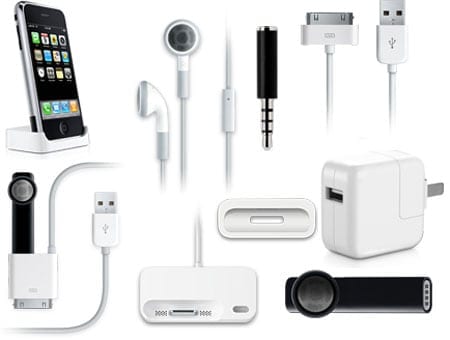
The iPhone is undoubtedly the most popular phone on the planet. Although there are several models, styles and colors, many of us look for ways to add our own little touch of style to our own handsets. The best way to sprinkle our own individuality to our handset is with some awesome iPhone accessories, not only do they make our phones that little bit sexier, but there are also some great accessories on the market to fully exploit the capabilities of our iPhones. Let’s take a look at which of these accessories you need in your life, right now.
accessories

Not exclusive to the iPhone but a vital piece of kit for any iPhone user is a power bank. Creating a long lasting battery which can support the capability of a smartphone without being drained in 2 or 3 hours is something that phone companies including Apple have been pilling millions of dollars of research money into. Whilst the current offerings do the job, you can give it that little extra boost when you’re out and about with a power bank, these are handy pocket-sized batteries which will juice up your phone in no time, and you need to get one if you don’t have one already.
powerbank

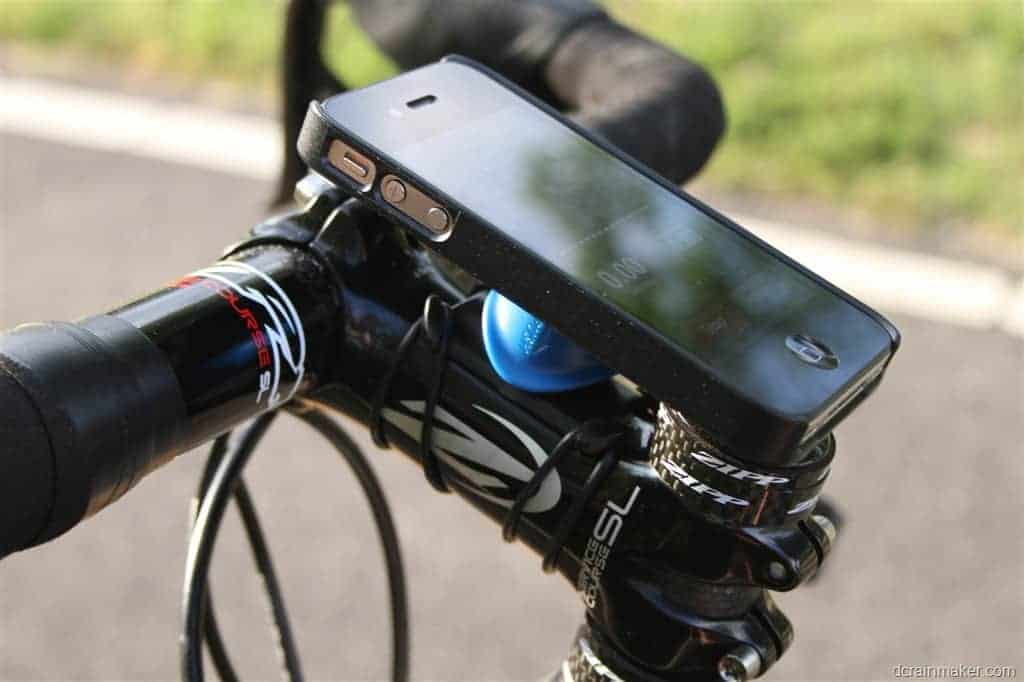
Bike Mount

Any cycling enthusiasts will love this cool gadget which allows them to easily mount their iPhone on the handlebars, perfect to track your movements, check messages as you cycle and a great way to stay on track with your maps. The mount is easy to install and will ensure that your phone stays in place as you go.
bike mount

Bluetooth Headphones

That pesky cable from your iPhone headphones can be troublesome, especially when you are working out or carrying bags. Bluetooth headphones offer a perfect, cable-free solution. There are many to choose from and you simply need to sync the headphones with your handset and then play your music and podcasts like usual, no more cables to worry about and enjoy a maximum sound.
headphones

Bluetooth Keyboard

Typing texts and notes is all well and good but if you want to write out an email or something that is a little more extensive, it can take its toll on your fingers. With a Bluetooth keyboard, you can comfortably type Word documents and emails with ease and most of the available keyboards are foldable and you can slip them right into your pocket.
keyboard

Snap on Camera

The iPhone camera is one of the best around but sometimes you need that little bit more clarity on your photos to make them look even more professional. In order to do this, you can add a super cool, high definition camera lens which simply snaps on to the top of your phone, it is small enough to carry around with you and will give the photos which you take using your phone that professional edge that you need. 

BitPlay-Snap-Pro-iPhone-6-6s-Case
One of the reasons why some airports, hotels, cafes and malls are working better than others is the “Free Wi-Fi”. However, we often forget that you are paying for these Wi-Fi connections with your personal data and other data points that the providers could use or sell to data collectors. It’s great that all these places offer free Wi-Fi to customers.


Free Wi-Fi Time limits
And the worst thing is, at many of these places, these free Wi-Fi is limited to 30 minutes or less, but many are starting to employ time limits to limit how long you spend in their establishments. Whatever the case may be, if you want to hang out longer than allowed, we generally require nothing more than a few clicks.
The solution would work practically everywhere ranging from airports to hotels to all coffee shops around the world that limit your time to access their free Wi-Fi service.

How To Restrict Free Wi-Fi Limits At Public Places:

This is a clever hack to get around the time restriction. By simply clearing cookies on your browser and registering again, you can restrict the time limits at these places.

Chrome Users:

1. You can clear the browser cookies by opening the Settings tab of Chrome browser and heading to Privacy.
Chrome Settings and Privacy
2. Click on ‘Clear Browsing Data’ in the privacy settings, open it and uncheck everything else except ‘Cookies and Site Data’.
Clear Browsing History

iOS Users:

Go to Safari settings from the Settings app and you can find ‘Clear History and Website Data’ in there which will delete the browser cookies.
Clear Browsing History in iPhone

Public Wi-Fi Safety Precautions:

Public Wi-Fi networks are great, but they aren’t always safe. Sharing a network with other people means that your personal information is in danger of being seen or accessed. Protect yourself by taking the following precautions:

  • Don’t enter sensitive information. Do your banking and online shopping at home to avoid exposing yourself to identity theft or credit card fraud.
  • Use ‘https’ (secure) websites as much as possible. While most frequented websites such as Facebook and email providers will automatically convert the URL to a secure connection, keep an eye on the URL to make sure. Chrome users can also install an extension that will encrypt your data with major websites to make your browsing safer.
  • Forget the network. Unless you specify otherwise, your computer or device will likely remember the Wi-Fi network and reconnect to it whenever you are in range. Doing this can leave your information exposed while you’re not browsing. Avoid this by unchecking ‘Connect Automatically’ in your network settings.
  • Enable two-factor authentication on frequently visited sites. By adding an extra layer of protection (i.e. entering your phone number or selecting an accompanying icon) to any password protected website, you are effectively reducing the likelihood of a hack.
Hope you liked the article and if you have any queries, please let us know in the comments section below.
This article is going to be one of the interesting articles ever as it shows the way to prank your friends/family. Sending your Fake Location in WhatsApp to others will be great fun, isn’t it? This prank let your friends believe your location (fake). It will really generate a lot of fun and stays as a memorable experience.

If you are looking for the way of how to share a fake location on WhatsApp, this tutorial helps you guide and have fun with your friends. This trick can be used without any VPN in Android device. In order to share location on WhatsApp in iPhone, first, you need to switch on your GPS location services in phone Settings.
  • Settings >Privacy > Location Services > On.
And make sure that WhatsApp allows accessing your GPS location.

Send Fake Location On WhatsApp In Android:

1. First, Install Fake GPS App in your Phone from here: Download
Fake GPS Location app
2. Then go to Phone Settings>About Phone.
3. Go on tapping on Build Number until you get a New Settings of Developer options.
4. Open your Phone’s SettingsAgain, and Select the option ofDeveloper Options, and tick on Allow Mock Locations Button.
Select Application

5. Now Open Fake GPS app from your Android Phone, and search the location of your choice.
6. After Searching the Location, simply click onSet Location and you are done.
Set Fake Location
Now Open Whatsapp, and Send Location to anyone, it will send the location which you haves set in Fake GPS app.
Send Fake Location

Send Fake Location On WhatsApp In iPhone:

Note: Your iPhone must be installed with Jailbreak and Cydia for use this Method.
Send Fake Location in iPhone
1. Open Cydia on your iPhone, and search for LocationFaker.
2. There, you will find 2 Versions of the App, and select it according to your iOS Version.
3. Install it via on-screen Instructions and you will get a New Icon of LocationFaker app in your Home Screen.
4. Open the app, and you will see your Current Location in this app. Simply zoom in and Select any other location of your Choice.
5. Now click on On Button from lower left corner, and you are done.
Now open WhatsApp and select Send-Location Option. Now you will be able to send location with Fake Address, which you have set in LocationFaker app.
Hope you had liked the article and if you have any queries, please let us know in the comments section below.
Whatsapp needs no Introduction, isn’t it? Everyone use it for Chatting with friends/family. Nowadays, people use WhatsApp daily for about at least 4-5 hours. The number is high in youngsters. Whatsapp messenger is mainly for chatting with friends/family whereas, some people use Whatsapp for their Business chatting. Whatsapp was recently updated with a new feature by which we can call to our friends/family on Whatsapp for free.

Many of us are using Whatsapp Calls, because of increasing voice call rates. Thus, Whatsapp got many new users because of this feature. This feature was added quite some time ago, but its users are still waiting for something new i.e. Whatsapp Call Recorder. One thing that disappoints the WhatsApp users is that there is no option in WhatsApp to record call in our device. This is one of the common questions in every Whatsapp user’s mind.
How to Record WhatsApp calls
According to the search reports, it is noted that people have even searched on the Internet for “How to record WhatsApp Call?” Though WhatsApp has no option of call recording in it, there are few ways to record WhatsApp calls. In this tutorial, we are going to present you the steps on how to record WhatsApp calls on Android/iPhone. For this, you don’t need any root access for using this process in your device.
There are many apps in Google PlayStore which claim to do the recording of WhatsApp calls. However, the below are some of the best, tried and tested apps. So you can be sure that it will work. Well, let’s get started.

WhatsApp Call Recording On Android Device:

Method-1:

1. First, download Whatsapp Call Recorder app on your Android from here: Download
2. After downloading, install and open it on your device.
3. Now open Whatsapp and make a call to anyone.
4. After the call gets connected, just open Whatsapp call recorder app and click on Red circle button. Thus, it starts recording the call.
whatsapp-call-recorder
5. Now when you want to stop recording, just click on (square inside the circle) button below Red button.
6. Hence, your call recording stops and is saved on your SD Card.

Method-2:

1. Download and Install Messenger Call Recorder app from PlayStore.
Enable-WhatsApp-Messenger-Call-Recorder
2. After installing, open the app and it asks to turn on the “Messenger Call Recorder” from your phone settings. Click on ENABLE NOW, it will navigate you to the Settings where you can enable it.
Enable-WhatsApp-Call-Recorder
3. You can also set it manually by heading to Settings and select Accessibility. Under Accessibility, tap on Messenger Call Recorder and turn it on.
List of WhatsApp call records
That’s it. Next, you call WhatsApp call, you can record it. To find your recordings open Messenger Call Recorder app and all your WhatsApp call recordings will be listed there. You can also share WhatsApp call recording via email, WhatsApp, Skype and more using this app.

WhatsApp Call Recording On iOS Devices:

At First, make sure you have Jailbreak on your iPhone, and Cydia Installed in it.
1. Open Cydia from your iPhone.
2. Open Cydia and search to download Watusi in BigBoss repo, as you already know it is the best repo for iPhone.
3. Watusi s is the premium application so if you want to purchase it, its best option otherwise you have to search for free on Google.
4. After successfully installing Watusi app, just open Whatsapp messenger and go to settings.
5. You will see a new option of Watusi Preferences there. Click on Record Calls option and enable it.
6. Now, simply make a call to anyone, and your calls will be recorded automatically.
7. You can get your recorded calls from Recent Panels button.

All the above methods and apps are exclusively for recording WhatsApp calls and won’t record cellular calls or other VOIP calls like Skype etc.
Do you know how Google makes money? Google gives us Internet-related services and products. But is makes money from every one of us by analyzing our Internet activities and displaying adverts, cloud computing, software, hardware and so on. But many of us don’t know that we can make money from Google as well and it’s very easy. Turn the tables on Google and get the Alphabet company to pay you to use your phone instead.


Google-Opinion-Rewards

Earn Money From Google By Answering Quick Surveys

If you want to earn some extra money in the form of Google Play Credit, Google will give you some in exchange for answering a few occasional survey questions. It’s nice to be able to get something out of Google and you can do this with the Google Opinion Rewards app for Android. This app will ask you to answer simple and quick surveys (not more than 5 questions and you shouldn’t have to give in any of your personal details). Then, you will be rewarded with Google credits.
Now you can purchase apps, music, movies and games from the Google play store. People in Spain and Germany can also purchase books and magazines. Questions can range from, “Which logo is best?” and “Which promotion is most compelling?” to “When do you plan on traveling next?”

Google Opinion Rewards App:

When the app is first running, you will be asked several questions designed to test your general knowledge and make sure the app is working OK. It takes only a minute to answer them all and then you are set to answer surveys. These surveys include everything from opinion surveys to hotel and product reviews to location-based merchant satisfaction surveys, and all of them come from Google Surveys users.
Set up Google opinion Rewards app

One thing that you have to keep in mind is that the surveys do expire after some time. This app in your phone does nothing most of the time, but every now and then it displays a notification that there is a survey it would like you to complete. It must be done within a certain time period, i.e. in the next 24 hours. As long as you check your phone once a day, you won’t miss the surveys.
Google Survey Questions
You can also create a survey and then set up custom audience panels to target Google Opinion Rewards users you’d like to reach. The rewards you get won’t pay your bills or anything, but each survey rewards anywhere from ten cents to a dollar. Though it looks so less, it can be helpful for buying a couple games and getting free movie rentals from the Google Play Store. Google Play credit even works on in-app purchases, in which you can buy Pokeballs or comic books.

How To Use The App:

When you get the notification, tap on it. Most surveys begin with an explanation of how this specific data is used. Tap “OK, got it.” Then you will see a set of questions and these question differ from one survey to another. Once you’ve finished answering all your questions, you’ll see how much credit you receive as a reward.
Google Opinion Rewards
According to the product manager at Google for the app, the best way to get more surveys is to answer honestly and respond to surveys quickly. If you want to make extra certain that you don’t miss a survey, you can enable a notification sound. To turn on the notifications, go to Settings and enable the “Notification sounds” toggle.
Turn ON notifications bar
Google Opinion Rewards Notifications
If you want to keep your data as private as possible, this app isn’t for you. Google will use this data to customize ads for you, on top of third-party marketing companies using it for analyzing your shopping habits. As long as you’re comfortable with that, enjoy your free money. Meanwhile, if you’d like to know how your data will be used, you can read Google’s FAQ on the subject uses here.
This is all about to earn money from Google by answering quick surveys. If you have any queries regarding the above method or app, let us know in the below comments.
Which method do you use to earn money from Google?
Blogger is a blog-publishing service that allows Multi-user blogs with time-stamped entries. It is one of the most efficient platforms for publishing your blog. Generally, the blogs are hosted by Google itself, at a subdomain of blogspot.com. You can have up to 100 blogs per account.
blogger.com
In the beginning all the Blogs were allowed to be published on various other hosting services, but later moved to Google’s own servers, with domains other than blogspot.com allowed via custom domain URLs. In layman’s language, we can simple say, Blogger.com is a free platform owned by Google where you can create blogs and share whatever you want to. It may be personal blog or a professional blog on a particular topic. Blogger, which stands for Web Logger, has increased in popularity over the past three years.

History And Stats of Blogger

  • On August 23, 1999, Blogger was launched by Pyra Labs. In February 2003, Pyra Labs was acquired by Google under undisclosed terms. This made many features in Blogger.com free!
  • BloggerIn 2004, when Google purchased Picasa, it made users to post photos to their blogs.
  • On May 9, 2004, Blogger introduced a major redesign, adding features such as web standards-compliant templates, individual archive pages for posts, comments, and posting by email.
  • On August 14, 2006, Blogger launched its latest version in beta, codenamed “Invader”, alongside the gold release. This migrated users to Google servers and had some new features, including interface language in French, Italian, German and Spanish.
  • By May 2007, Blogger had completely moved to Google operated servers.
  • Blogger was ranked 16 on the list of top 50 domains in terms of number of unique visitors in 2007.

Why Blogger? Features of Blogger

Now you know what Blogger.com is. But let me tell you why you should choose Blogger as your platform for building a wonderful and professional blog or website. Here are few features of Blogger which are definitely going to amaze you.
why blogger

Integrated login with Your Google Account

Blogger.com is directly linked to your Google account, so you can simply log in with that. You just need to create a new blog with a particular Title and Address. The address of your free blog is created with an extension “.blogspot.com”.
Many Blogging services like Adwords, Adsense and Webmaster tools for indexing are provided by Google. So instead of adding code into your template you can simply click a button and integrate Adsense banners into your site.

Less Technical

Creating a blog on Blogger allows a newbie to easily understand and edit the blog. Just basics about html are enough to work efficiently, which is pretty easy. Users of any background (non-technical) can get into Blogger; no high technical knowledge on coding or any language is required.
Any kind of people

Change Appearance and Code of Templates

In Blogger, there are a number of pre-built templates as well as thousands more available from any number of websites. You can just download the template and upload it on your Blogger blog. Changing the colours can be done by editing the HTML and CSS coding. Make the website your own even in terms of the way it looks.

Create Pages, Forums and Discussion groups

You can create pages, write articles and perform many other operations and directly publish them into the internet world. You can see all the users who have published blogs and even comment or enter information on their blogs. Discussion groups and personal files are housed all within this environment making it a fun place to surf about and learn about different people and things.
You can even make your readers subscribe to your blog and contact them directly when you post new content or when you make changes on your blog.
why blogger?

Backed Up by Google

Blogger has the backing of the largest and most powerful Internet Company in the world. As Blogger is hosted directly under Google servers, it is the most secure platform to build a website or blog. Hacking a Blogger blog is next to impossible!
Also, Blogger never crashes. It can handle huge amounts of traffic at a particular point of time i.e. current visitors to your blog.

Country Specific

Blogger has integrated all its blogs with multiple user specific URL addresses i.e. “yourtitlename.blogspot.com” will automatically redirect to yourtitlename.blogspot.in in India, yourtitlename.blogspot.us in USA etc.
Blogger explained that by doing this they could manage the blog content more locally so if there was any objectionable material that violated a particular country’s laws they could remove and block access to that blog for that country through the assigned ccTLD while retaining access through other ccTLD addresses and the default BlogSpot.com url.

Integration of Multiple Accounts

Blogger makes it easy to view all of your blogs via a dashboard feature that links directly to your Google login. When you login, all of your blogs will display, with one-click options to post, edit, or alter posts. The number of blogs and accounts available is nearly endless and makes blogging on multiple topics easier than ever.

Auto-Share

When you compile and publish a post on blogger, its interface is designed in such a way that it prompts you to share your new post with your Google+ followers, creating more audience for your blog. Blogger also have in-built share button, which means, you don’t have to worry about editing share button code into your blog template.

Blogger on Mobile Devices

Blogger has also launched mobile applications for users with mobile devices. You can edit or post articles on your blog directly from your mobiles. Not only advanced mobile devices, such as smartphones, are being considered, since users can also post blogs via traditional cell phones by SMS and MMS.
blogger on mobile
Finally, I would say Blogger is the best platform for anyone who is starting his first blog. Go for Blogger if you are serious about blogging and don’t want to hire an expert to design your blog and make regular adjustments. It is free, easy to use, quick to start, offers unlimited hosting bandwidth.